Bill,
An editing teacher, or any user with equivalent or greater editing rights, can edit a question even after the quiz has been attempted by students.
As Anthony says, it is not possible to delete a question once a quiz has been attempted. It's also not possible to add new questions to a quiz once a quiz has been attempted. However, it is always possible to edit questions. It is even possible to change which possible answer is teated as correct. However, when doing this, you will have to click on the 'regrade' link in the Results screen.
The only reason why people might not be able to edit a question is that it belongs to another 'teacher'. Although this restriction does not apply to admins.
There are a number of ways to edit questions. One way is to open a preview of a quiz and then click on the editing a 'hand' to the left of the question. Another way is to click on the link to a quiz, then click on the 'Edit' tab. You'll then see a list of all the questions in the quiz. Click on the editing a 'hand' to the right of the question name to edit it.
Hope this helps.
Peter Ruthven-Stuart
Mensagens colocadas por Peter Ruthven-Stuart
Moodle in English -> Quiz and question banks -> Quiz being incorrectly scored in second attempt, a bug?
por Peter Ruthven-Stuart -
Hello,
I have created a 41 item quiz that students can do twice. However, it appears that items that students got right on the first attempt are not being included in the score of the second attempt, and so their final score goes down. I've never experienced this before, but this is the first time that I have used 'average grade' as the Grading Method.
Quiz settings:
What happens:
After the first attempt, students' efforts are scored as expected. In the feedback screen they also got to see which items were correct, as intended. However, after the second attempt, questions that they had answered in the first attempt appear to have been ignored (see jpg below):
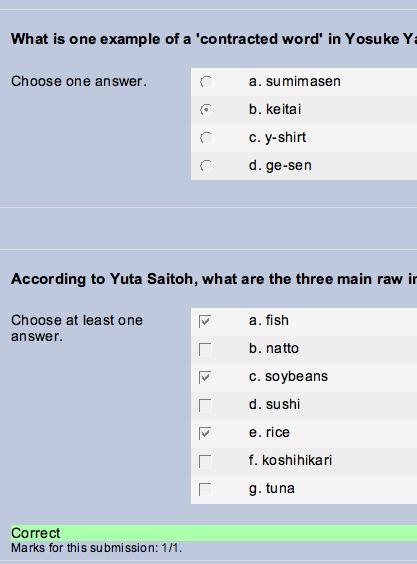
This screen shot is from a student's point of view. The first question was answered correctly in the first attempt, but after having the second attempt scored, it appears to have been ignored. You can see that there is no green feedback for the question, and no indication about whether or not the question is correct. The second question with the green feedback was not answered in the first attempt, but was answered correctly in the second attempt.
In the teacher's view of the second attempt, the feedback under each question appears as expected, but the reported total score is only the score for the questions answered in the second attempt that were not answered in the first.
To me, this looks like a bug perhaps relating to 'average scoring', but before reporting it as such, does any one have any suggestions. Perhaps I am making a simple error.
Thank you.
I have created a 41 item quiz that students can do twice. However, it appears that items that students got right on the first attempt are not being included in the score of the second attempt, and so their final score goes down. I've never experienced this before, but this is the first time that I have used 'average grade' as the Grading Method.
The details:
Moodle 1.8.2 (downloaded from CVS bout 2 weeks ago)Quiz settings:
Questions per page: 6
Attempts allowed: 2
Each attempt builds on the last: Yes
Adaptive mode: No
Grading method: Average grade
Attempts allowed: 2
Each attempt builds on the last: Yes
Adaptive mode: No
Grading method: Average grade
What happens:
After the first attempt, students' efforts are scored as expected. In the feedback screen they also got to see which items were correct, as intended. However, after the second attempt, questions that they had answered in the first attempt appear to have been ignored (see jpg below):
- there is no indication whether or not the answers are correct or incorrect,
- and the total score for the second attempt only includes those questions they answered in the second attempt that they did not answer in the first attempt.
- Changing the Quiz settings, does not solve this problem.
This screen shot is from a student's point of view. The first question was answered correctly in the first attempt, but after having the second attempt scored, it appears to have been ignored. You can see that there is no green feedback for the question, and no indication about whether or not the question is correct. The second question with the green feedback was not answered in the first attempt, but was answered correctly in the second attempt.
In the teacher's view of the second attempt, the feedback under each question appears as expected, but the reported total score is only the score for the questions answered in the second attempt that were not answered in the first.
To me, this looks like a bug perhaps relating to 'average scoring', but before reporting it as such, does any one have any suggestions. Perhaps I am making a simple error.
Thank you.
Moodle in English -> Authentication -> Users registering via No authentication can't login -> Re: Users registering via No authentication can't login
por Peter Ruthven-Stuart -
Here's an update to the above posting:
The issue I reported is not a bug. It seems that for security reasons it is no longer possible to allow people to register via 'No authentication', then switch the system back to Email-based authentication and still have these people successfully login.
Details can be found here:
http://tracker.moodle.org/browse/MDL-9687
The issue I reported is not a bug. It seems that for security reasons it is no longer possible to allow people to register via 'No authentication', then switch the system back to Email-based authentication and still have these people successfully login.
Details can be found here:
http://tracker.moodle.org/browse/MDL-9687
Moodle in English -> Database -> Is it possible to make ##user## a filterable & searchable field? -> Re: Is it possible to make ##user## a filterable & searchable field?
por Peter Ruthven-Stuart -
Hello Ray,
Yes. I've made a request for an improvement to the Database activity module here:
http://tracker.moodle.org/browse/MDLSITE-191
I'm not sure if the Moodle Tracker is the right place to make such requests, but let's hope that one of the Database activity developers notices it .
.
"It's a "Sort by author" equivalent.... worthy of a feature request?"
Yes. I've made a request for an improvement to the Database activity module here:
http://tracker.moodle.org/browse/MDLSITE-191
I'm not sure if the Moodle Tracker is the right place to make such requests, but let's hope that one of the Database activity developers notices it
.Moodle in English -> Forum -> How to set 'Only teachers can rate posts' in 1.8 -> Re: How to set 'Only teachers can rate posts' in 1.8
por Peter Ruthven-Stuart -
Martin,
Thank you very much for your reply.
"I'm keen to find better user interface solutions if you think of any."
Here's a simple suggestion. How about adding the following to just below the 'Allow posts to be rated?' check box:
or, even better, again under the 'Allow posts to be rated?' check box, add a link to the Overide Roles page:
Also, a link to a relevant Moodle Doc page would be useful. e.g.:
http://docs.moodle.org/en/Forum_permissions
Any way, I think the important thing in the Forum setup interface is to alert users to the fact that it is possible to fine tune things via the Override Roles utility. I guess this applies to other activity modules as well?
Thank you very much for your reply.
"I'm keen to find better user interface solutions if you think of any."
Here's a simple suggestion. How about adding the following to just below the 'Allow posts to be rated?' check box:
To control who can and can't rate posts click on the Roles tab, and then on 'Override roles'.
or, even better, again under the 'Allow posts to be rated?' check box, add a link to the Overide Roles page:
Note: the default setting is that only teachers can rate posts. Click here to override this setting (e.g. to allow students to rate).
Also, a link to a relevant Moodle Doc page would be useful. e.g.:
http://docs.moodle.org/en/Forum_permissions
Any way, I think the important thing in the Forum setup interface is to alert users to the fact that it is possible to fine tune things via the Override Roles utility. I guess this applies to other activity modules as well?