I have been experimenting some more.
I created a course in the problem moodle site. Added a user as an editing-teacher, and as described above, the teacher could not add resources or activities. However, she could edit resources and activities that I had added (I'm an admin).
I then made a backup of this new course, including the editing-teacher. I then restored this course into a different moodle 1.9 system, which was also backed up from 1.8.4. This other moodle 1.9 system is build 20080401, so slightly older than the problem site.
In this restored course, the editing-teacher could add resources and activities.
The puzzle continues.
Peter Ruthven-Stuart
Missatges enviats per Peter Ruthven-Stuart
Moodle in English -> Roles and permissions -> In 1.9 users can edit old courses but not new ones, despite being an editing teacher in both
per Peter Ruthven-Stuart -
Hello,
I think this is a bug, but would like to check that I am not missing something obvious, before making a report in the tracker.
In moodle 1.9 users can add resources and activities to old courses but not to new ones, despite being an editing teachers in both.
The details:
Last weekend I upgraded from 1.8.4 to 1.9. I did have a problem with teachers not being able to edit courses, but after a reinstall it seemed that everything was fixed. You can read about the original issue here.
However, I have now discovered that in courses that existed prior to the upgrade, teachers in those courses have full editing rights as expected. However, when I create a new course and give those same users editing rights to new courses, they can not see the Add resource or Add activity menus. They see something like this:
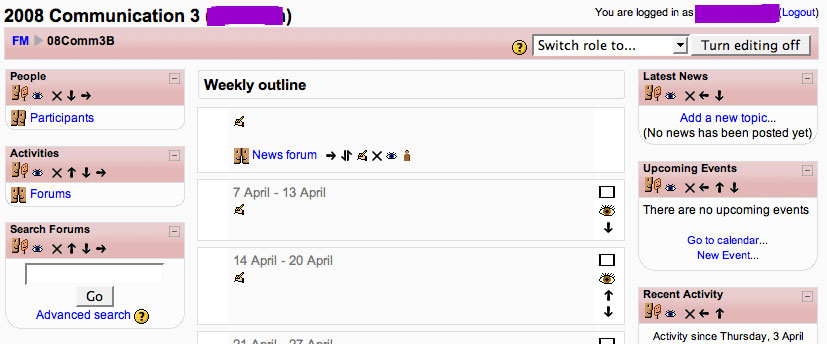
As you can see, the teacher of this course is able to edit various aspects of the course, even change the course settings, but she can not add resources or activities.
What is more, if I now make a user an editing teacher of a course that existed prior to the upgrade, they can add resources and activities. It is only with courses created since the upgrade that teachers can not add resources or activities.
I have checked the setting for "defaultuserroleid", and it's "Authenticated user", which is apparently what it should be.
Interestingly, when I make this user a site wide teacher via Users > Permissions > Assign system roles, they are able to add resources and activities to the above course. However, this is not a solution since it means they can do that to every course in the site.
If users experienced this problem in all courses where they have editing rights, then it would 'make sense', but the bizarre thing is that they only experience this when its in a course that has been created since the upgrade to 1.9.
If anyone has any bright ideas, I'll be very grateful.
system details:
moodle 1.9 (build 20080417)
php 5.2.1
MySQL 5.0.37
I think this is a bug, but would like to check that I am not missing something obvious, before making a report in the tracker.
In moodle 1.9 users can add resources and activities to old courses but not to new ones, despite being an editing teachers in both.
The details:
Last weekend I upgraded from 1.8.4 to 1.9. I did have a problem with teachers not being able to edit courses, but after a reinstall it seemed that everything was fixed. You can read about the original issue here.
However, I have now discovered that in courses that existed prior to the upgrade, teachers in those courses have full editing rights as expected. However, when I create a new course and give those same users editing rights to new courses, they can not see the Add resource or Add activity menus. They see something like this:
As you can see, the teacher of this course is able to edit various aspects of the course, even change the course settings, but she can not add resources or activities.
What is more, if I now make a user an editing teacher of a course that existed prior to the upgrade, they can add resources and activities. It is only with courses created since the upgrade that teachers can not add resources or activities.
I have checked the setting for "defaultuserroleid", and it's "Authenticated user", which is apparently what it should be.
Interestingly, when I make this user a site wide teacher via Users > Permissions > Assign system roles, they are able to add resources and activities to the above course. However, this is not a solution since it means they can do that to every course in the site.
If users experienced this problem in all courses where they have editing rights, then it would 'make sense', but the bizarre thing is that they only experience this when its in a course that has been created since the upgrade to 1.9.
If anyone has any bright ideas, I'll be very grateful.
system details:
moodle 1.9 (build 20080417)
php 5.2.1
MySQL 5.0.37
Moodle in English -> Wiki -> The nWiki that will not die -> Re: The nWiki that will not die
per Peter Ruthven-Stuart -
Steve,
I assume that you are talking about removing a single Nwiki activity from a course, rather than expunging the entire Nwiki module from your moodle system?
Not sure why you should be having this problem, but it seems curious that when you click on the 'x' mark to the right of your wiki activity, you get a message that says, "delete resource?". After all, Nwiki is an activity module not a resource. I would only expect such a confirmation message when trying to delete a resource - a web page for example.
I assume that you are talking about removing a single Nwiki activity from a course, rather than expunging the entire Nwiki module from your moodle system?
Not sure why you should be having this problem, but it seems curious that when you click on the 'x' mark to the right of your wiki activity, you get a message that says, "delete resource?". After all, Nwiki is an activity module not a resource. I would only expect such a confirmation message when trying to delete a resource - a web page for example.
Moodle in English -> Gradebook -> Is it possible to add conditions (IF) to grade calculations in 1.9? -> Re: Is it possible to add conditions (IF) to grade calculations in 1.9?
per Peter Ruthven-Stuart -
Anthony,
Thanks for your reply.
As you suggested, I have made a feature request: MDL-14274.
Please vote for this feature if you think it might be useful.
Thank you.
Thanks for your reply.
As you suggested, I have made a feature request: MDL-14274.
Please vote for this feature if you think it might be useful.
Thank you.
Moodle in English -> Gradebook -> Is it possible to add conditions (IF) to grade calculations in 1.9?
per Peter Ruthven-Stuart -
Hello,
I have been experimenting with the new gradebook features in 1.9.
I understand that when calculating the grade for a category or total grade, it is possible to use various formulas:
http://moodle.org/help.php?module=grade&file=calculation.html
However, it does not appear to be possible to use an IF formula (condition) as can be done in Excel - or am I wrong?
I'd like to be able to calculate a total of x number of quizzes, but not include the scores of quizzes that are less than, for example, 50%.
In Excel, the formula would be as follows:
=SUM((IF(A1>=50,A1,0))+IF(B1>=50,B1,0)+IF(C1>=50,C1,0))
so that quizzes A1, A2 & A3 are added together, but if the score of any one quiz falls below 50%, it is treated as 0%.
For example:
the total for student1 is only 150 (not 180) because his score for quizA1 is less than 50, and so is treated as zero, so 0+80+70=150
I know it's possible to indicate a "Grade to pass" for any item or category, but this seems to only change the background colour of a score: green for pass, red for fail. It does not effect the category score to which that item belongs.
Any suggestions would be most welcome.
I have been experimenting with the new gradebook features in 1.9.
I understand that when calculating the grade for a category or total grade, it is possible to use various formulas:
http://moodle.org/help.php?module=grade&file=calculation.html
However, it does not appear to be possible to use an IF formula (condition) as can be done in Excel - or am I wrong?
I'd like to be able to calculate a total of x number of quizzes, but not include the scores of quizzes that are less than, for example, 50%.
In Excel, the formula would be as follows:
=SUM((IF(A1>=50,A1,0))+IF(B1>=50,B1,0)+IF(C1>=50,C1,0))
so that quizzes A1, A2 & A3 are added together, but if the score of any one quiz falls below 50%, it is treated as 0%.
For example:
| quizA1 |
quizA2 |
quizA3 |
Total |
|
| student1 |
30 |
80 |
70 |
150 |
| student2 |
60 |
80 |
70 |
210 |
the total for student1 is only 150 (not 180) because his score for quizA1 is less than 50, and so is treated as zero, so 0+80+70=150
I know it's possible to indicate a "Grade to pass" for any item or category, but this seems to only change the background colour of a score: green for pass, red for fail. It does not effect the category score to which that item belongs.
Any suggestions would be most welcome.