Moodle Plugins directory: AutoProctor Integration | Moodle.org

AutoProctor Integration
Quiz access rules ::: quizaccess_autoproctor
Maintained by  Auto Proctor
Auto ProctorAutoProctor is a quiz access rule plugin that integrates automated proctoring into Moodle quizzes. It monitors students during online exams using their camera, microphone, and screen to help prevent cheating and ensure exam integrity.
Latest release:
3 sites
60 downloads
1 fans
Current versions available: 1
AutoProctor Integration brings AI-powered exam proctoring directly into Moodle quizzes. It works as a quiz access rule, so students must pass through the consent and permissions flow before an attempt begins - no separate app or window required.
Key Features
- Automated Monitoring - tracks student behaviour using camera, microphone, and screen during quiz attempts
- Flexible Tracking Options - teachers can enable/disable individual tracking features per quiz, including: audio detection, multiple-person detection, tab-switch detection, random photos, live camera preview, screenshot on tab switch, full session recording, multiple monitor detection, and forced fullscreen
- Student Consent Workflow - students are shown a clear consent screen before the exam starts, with browser permissions requested transparently
- Proctoring Reports - teachers and managers can view per-attempt reports with trust scores, flagged events, and session recordings via the "View AutoProctor Results" button
- Seamless Integration - works within the standard Moodle quiz workflow with no additional student software required
Requirements
- Moodle 4.1 or higher
- An AutoProctor account with API credentials (available at autoproctor.co)
- Students need a webcam, microphone, and a modern browser (Chrome, Firefox, or Edge)
Installation
Method 1: Upload via Moodle Admin
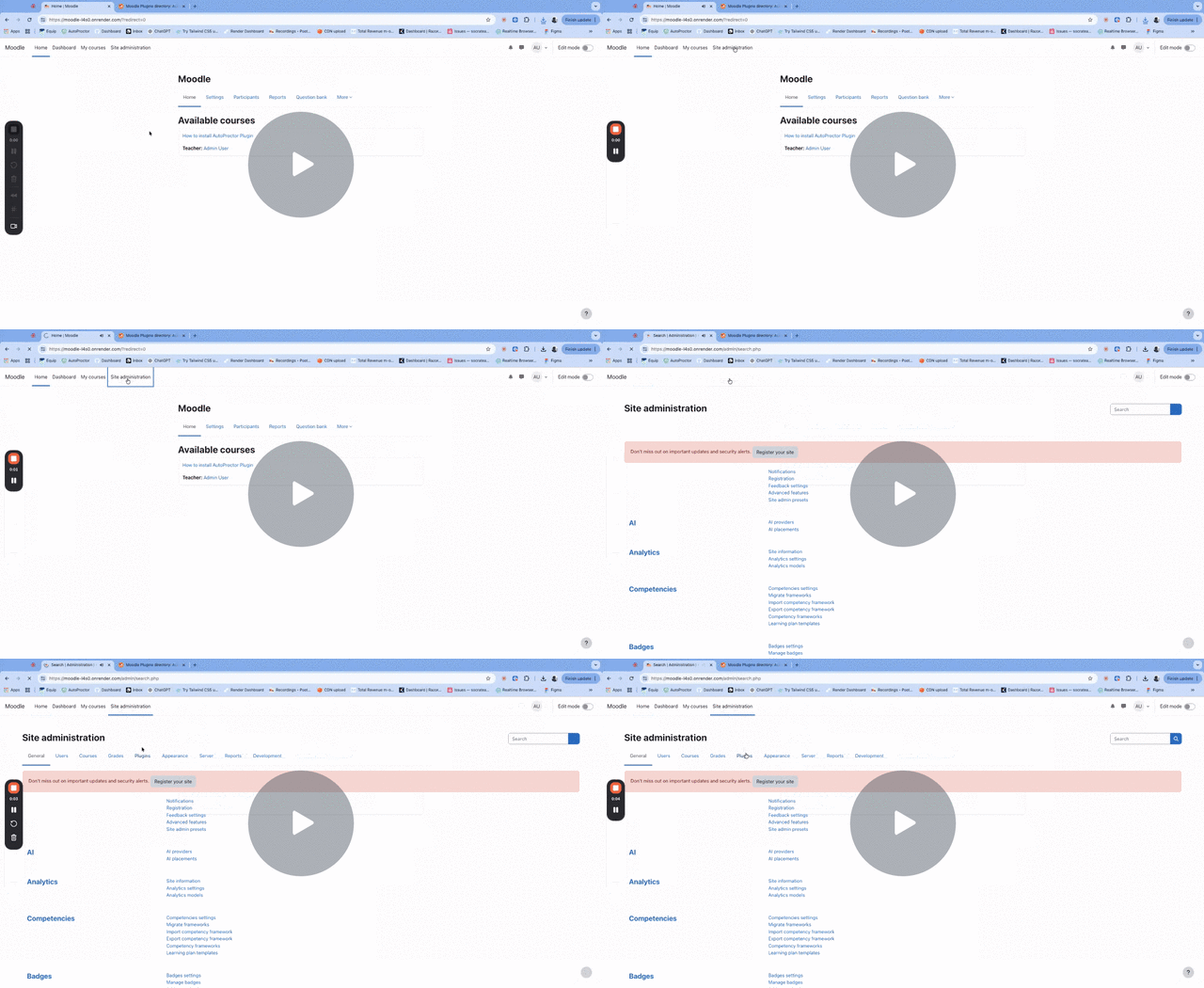
- Download the plugin ZIP file
- Go to Site Administration > Plugins > Install plugins
- Upload the ZIP file and click "Install plugin from the ZIP file"
- Follow the on-screen prompts to complete installation
Method 2: Manual Installation
- Extract the plugin to
/mod/quiz/accessrule/autoproctor - Visit Site Administration > Notifications to trigger the installation
- Follow the on-screen prompts
Configuration
Step 1: Get API Credentials
- Register at autoproctor.co/developers/register
- After registration, you'll receive a Client ID and Client Secret
Note: If you see the warning "AutoProctor key-pair (credentials) are not set" on a quiz page, it means you haven't configured the credentials yet.
Step 2: Add API Credentials to Moodle
- Go to Site Administration > Plugins > Activity modules > Quiz > AutoProctor Integration
- Enter your Client ID and Client Secret
- Optionally enable "Enable AutoProctor by default" for all new quizzes
- Save changes
Step 3: Enable on a Quiz
- Edit any quiz and expand the AutoProctor Settings section
- Set "Turn AutoProctor On" to Yes
- Configure individual tracking options as needed
- Save the quiz
Usage
For Teachers/Administrators
Enabling Proctoring:
- Edit the quiz settings
- Scroll to "AutoProctor Settings"
- Enable proctoring and select desired tracking options
- Save changes
Viewing Reports:
- Go to the quiz page
- Click the "View AutoProctor Results" button (visible to teachers/managers)
- Review trust scores, flagged events, and session recordings
For Students
- Navigate to the proctored quiz
- Click "Attempt quiz"
- Review the permissions required (camera, microphone, screen)
- Check the consent box and click "Start attempt"
- Allow browser permissions when prompted
- Wait for AutoProctor to initialize
- Complete the quiz as normal
- Submit the quiz - proctoring stops automatically
Permissions
The plugin adds one capability:
| Capability | Description | Default Roles |
|---|---|---|
quizaccess/autoproctor:viewreport |
View proctoring reports | Teacher, Editing Teacher, Manager |
Troubleshooting
"AutoProctor credentials are not set"
- Ensure Client ID and Client Secret are configured in plugin settings
- Verify credentials are correct from your AutoProctor dashboard
Proctoring won't start
- Check browser permissions for camera/microphone/screen sharing
- Try a different browser (Chrome recommended)
- Disable browser extensions that might block permissions
- Ensure stable internet connection
Students can't access the quiz
- Verify the quiz has AutoProctor enabled
- Check that students have accepted the consent checkbox
- Ensure students are using a compatible browser
Privacy & Data
AutoProctor collects:
- Webcam photos/video
- Audio from microphone
- Screen recordings (if enabled)
- Tab switch events
- Multiple person detection events
All data is processed by AutoProctor's servers. Review AutoProctor's Privacy Policy for details on data handling and retention.
Support
- Documentation: https://www.autoproctor.co/developers/docs
- Issues: Report bugs on the plugin repository
- Contact: hello@autoproctor.co
License
This plugin is licensed under the GNU GPL v3 or later.
http://www.gnu.org/copyleft/gpl.html
Credits
Developed by AutoProctor
Useful links
Screenshots


Contributors

Auto Proctor (Lead maintainer)
Please login to view contributors details and/or to contact them

Comments