Moodle Plugins directory: Grades sorter: Versions: 2020071923 | Moodle.org
Grades sorter
Blocks ::: block_grades_sorter
Maintained by  Mathieu Degrange
A moodle plugin to add a block to course providing a button to automatically sort grades in the same order than activities
Grades sorter 2020071923
Moodle 3.9
Released: maanantaina 20. heinäkuuta 2020, 05.58
A moodle plugin to add a block to course providing a button to automatically sort grades in the same order than activities
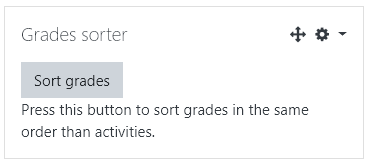
Add this block to your course, then enable course editing (the block is invisible when not editing) and press the button, you grade in gradebook are now sorted in the now same order than activies order in your course.
Grades will be keept in their category, and grades that are not from activities will be moved last (while keeping their relative order).
Version information
- Version build number
- 2020071923
- Maturity
- Unknown
- MD5 Sum
- cba9905c45f4c7bf52d80890b86d0652
- Supported software
- Moodle 3.9
- Latest release for Moodle 3.9
Version control information
- Version control system (VCS)
- GIT
- VCS repository URL
- VCS tag
- 2020071923
Default installation instructions for plugins of the type Blocks
- Make sure you have all the required versions.
- Download and unpack the block folder.
- Place the folder (eg "myblock") in the "blocks" subdirectory.
- Visit http://yoursite.com/admin to complete the installation
- Turn editing on in any home or course page.
- Add the block to the page
- Visit the config link in the block for more options.