updating with cvs to MOODLE_19_STABLE

updating with cvs to MOODLE_19_STABLE

by John Isner -
Number of replies: 16
I am trying to update Moodle using anonymous cvs from the command line on Unix.

My current version was checked out from the trunk (MOODLE_19_BETA).

I want to get the latest version on the MOODLE_19_STABLE branch.

Following the directions in "CVS for developers", I cd to my Moodle rootdir, log in to cvs, and type

cvs update -dP -r MOODLE_19_STABLE

cvs prompts me for a password (just hit return). After a short delay, I get back the command prompt. But there is no output from cvs and no files have been updated.

What am I doing wrong?

FYI the exact commands were:

cvs -d:pserver:anonymous@uk.cvs.moodle.org:/cvsroot/moodle login

cvs update -dP -r MOODLE_19_STABLE


Average of ratings: -
In reply to John Isner

Re: updating with cvs to MOODLE_19_STABLE

by John Isner -
I re-posted this question in the Installation problems forum.
In reply to John Isner

Re: updating with cvs to MOODLE_19_STABLE

by Helen Foster -
Picture of Core developers Picture of Documentation writers Picture of Moodle HQ Picture of Particularly helpful Moodlers Picture of Plugin developers Picture of Testers Picture of Translators
Hi John,

Just to let you know, I've just moved this discussion to the installation problems forum and deleted your duplicate posting.
In reply to John Isner

Re: updating with cvs to MOODLE_19_STABLE

by Just H -
Hi John

Only difference between what I did and what you've done is I didn't log in to CVS.

Assuming a Moodle install is up and running from a CVS checkout, I just CD to the root of the Moodle install and then execute the "cvs update -dP -r MOODLE_19_STABLE" command.

Worked for me a month or so back.

H
In reply to Just H

Re: updating with cvs to MOODLE_19_STABLE

by John Isner -
Hi Harry,
I tried your suggestion (not logging in). It made absolutely no difference. Again, I just got back the command line prompt after about 2 seconds, as if cvs had decided that everything was up-to-date.

The file revision numbers in my version and those in cvs are definitely different. In my moodle root directory CVS/Entries, I have

index.php 1.201
version.php 1.554
...

while the Sourceforge CVS Web interface with sticky tag MOODLE_19_STABLE shows

index.php 1.201.2.2
version.php 1.563.2.7
...

Could it be a problem with the uk repository, or a problem with my CVS/Root? Here is my CVS/Root:

:pserver:anonymous@uk.cvs.moodle.org:/cvsroot/moodle


In reply to John Isner

Re: updating with cvs to MOODLE_19_STABLE

by Just H -
Hi John

Sorry, I'm far from being an expert on CVS. All I've ever done with it is install and update various sites and so far never hit any problems so not sure what the problem would be.

I use the UK mirror as well and it's exactly the same as you posted.

Out of curiosity I just tried it on another old test site I have - running Moodle 1.6.5 + (2006050550) - and it updated the files fine (just logging into my server, cd to public_html, then execute "cvs update -dP -r MOODLE_19_STABLE").

The actual upgrade started fine but now stuck at the new "Plugins check" the upgrade does, no continue button, no lists, no error message :(

Never actually looked in
moodle root directory CVS/Entries until now but I have:

/index.php/1.201.2.3/Sat Feb 2 16:25:26 2008//TMOODLE_19_STABLE
/version.php/1.563.2.16/Sat Feb 2 16:25:29 2008//TMOODLE_19_STABLE

So guessing it couldn't be newer unless I had developer access.

Sorry I can't be more help but at least it takes the UK mirror out of the equation. Perhaps try checking out a new copy into a new directory, should prove one way or another if it's an issue with your connection to the mirror and depending on what modifications you've made might be the fastest way to upgrade rather than debugging.

Good luck!

H
In reply to Just H

Re: updating with cvs to MOODLE_19_STABLE

by John Isner -
Hi Harry,
I'm sure it's not a problem with my connection. Other cvs commands work just fine. I have also tried doing cvs update several times over the last 24h with the same result. Also, I don't see anyone else complaining about problems. For some unknown and extremely irritating reason, cvs update is telling me (by its silence) that no files need updating.

By the way, my $ROOTDIR/CVS/Entries are

/index.php/1.201/Sat Oct 6 19:32:42 2007//
/version.php/1.554/Sat Oct 6 19:32:43 20007//
...

I assume the empty slashes at the end mean I'm on the trunk, confirming the info in my original post. Yours are on the MOODLE_19_STABLE branch.

In reply to John Isner

Re: updating with cvs to MOODLE_19_STABLE

by Just H -
Hi John

Any luck yet?

Just had a thought, depending on how critical your site is (e.g. is it a test site or your production site?) might be worth trying putting:

TMOODLE_19_STABLE

in your CVS > tag file.

As mentioned before, shooting in the dark here really, but doesn't seem right having nothing after the back slashes, would have thought there had to some sort of tag for the software to know what it's supposed to be updating?

H


In reply to Just H

Re: updating with cvs to MOODLE_19_STABLE

by John Isner -
Hi Harry,
It's a linux system on my desktop that I use for testing.

I'll try your tag file idea and let you know if it makes a difference.

Having nothing between the slashes is to be expected IMO, since I currently have code checked out from the trunk a.k.a. "head." If I am ever able to update onto the MOODLE_19_STABLE branch, I expect to see // change to /TMOODLE_19_STABLE/.

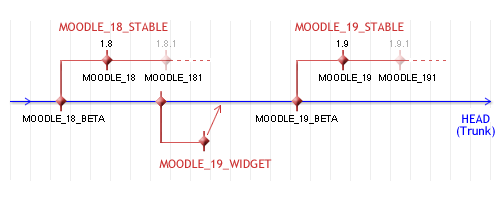
Here's the complete cvs history (I keep carefult notes).
Cvstree.png

4/27/07
Checked out original source from repository 212.219.207.22 since sourceforge had recently disabled anonymous checkout (MDLSITE-182)

cvs -z3 -d:pserver:anonymous@212.219.207.22:/cvsroot/moodle co -r MOODLE_18_STABLE moodle

--> 1.8+

7/6/07
Update along the MOODLE_18_STABLE branch. By now, mirrors had been set up. Ran shell script to edit the content of CVS/Root files, changing 212.219.207.22 to uk.cvs.moodle.org (as per article "CVS for Administrators").

cvs update -dP

1.8+ --> 1.8.2

7/22/07
Another update along the MOODLE_18_STABLE branch

cvs update -dP

1.8.2 --> 1.8.2+

10/6/07
Update from MOODLE_18_STABLE branch back to the trunk a.k.a. "head"

cvs update -dPA

1.8.2+ --> 1.9 Beta+.

2/1/08
(Failed) update from trunk to MOODLE_19_STABLE branch

cvs update -dP -r MOODLE_19_STABLE

BUT NOTHING HAPPENS


In reply to John Isner

Re: updating with cvs to MOODLE_19_STABLE

by Just H -
Hi John

Sadly, I'm one of those people who don't practice what they preach . . . keep telling my team to document stuff but 9 times out of 10 fail to do so myself so quite impressed with your record keeping smile (I tend to do an update a couple of times a week.)

As mentioned, until this thread, never looked in those files so wouldn't have a clue what's normal; never checked out head either so nothing to check back on my end sadly.

"I expect to see // change to /TMOODLE_19_STABLE/."

That doesn't seem right from what I can see this end. Just checked another couple of installs and the tag comes after the // in both of them too - not between the backslashes. Why I thought perhaps the tag was somehow missing (perhaps naively but I assumed it would be "//THEAD" or something along those lines on a HEAD checkout).

One of these days I really should get my head around CVS properly, just because I've been lucky so far doesn't mean the luck will hold out!

H
In reply to Just H

Re: updating with cvs to MOODLE_19_STABLE

by John Isner -
Sorry for the misprint. Instead of

I expect to see // change to /TMOODLE_19_STABLE/

I should have said

I expect to see // change to //TMOODLE_19_STABLE

As far as I know, the tag is only needed on a stable branch. If omitted, it refers to head.

Have you actually checked out anything on MOODLE_19_STABLE? In other words, do you have a site with CVS/Entries with the //TMOODLE_19_STABLE? You said earlier that "it worked for me a month back."
In reply to John Isner

Re: updating with cvs to MOODLE_19_STABLE

by Just H -
Yep, got one production site that's been running 1.9 since before Christmas (an upgrade from 1.6+), one test site upgraded from 1.6+ just before the production site, and the one I tried yesterday which did upgrade the files, but unfortunately got stuck on the actual database upgrade (see MDL-13101) which may or may not be a bug in new functionality.

If I remember correctly, have had trouble with all of them, but due to local small hacks needing fixed up, not from the actual cvs upgrade as such.
In reply to Just H

Re: updating with cvs to MOODLE_19_STABLE

by John Isner -
Problem solved. Don't ask how. Suffice it to say that I am an idiot. Everything is working exactly as it should.
In reply to John Isner

Re: updating with cvs to MOODLE_19_STABLE

by Just H -
Very glad to hear big grin

How much of a bribe do we need to find out what the issue was? wink
In reply to Just H

Re: updating with cvs to MOODLE_19_STABLE

by John Isner -
Would you believe "The computer was not plugged in?"

Well, it was almost as bad as that. I'll never tell blush

But seriously, thanks for sticking with me and continuing to help. Because of your help, I knew it had to be something on my end.
In reply to John Isner

Re: updating with cvs to MOODLE_19_STABLE

by Gary Anderson -
John:

Unless you have hand-customized your scripts, I could just make a copy of your config.php file, delete (or move) your old Moodle Directory, and then do a fresh CVS install. Copy the config.php file into that moodle folder, and you should be ready to go.

Also, here is how I do it. I normally do my cvs command one level above and identify the directory, so:

cd /var/www
cvs -q -z3 -d:pserver:anonymous@eu.cvs.moodle.org:/cvsroot/moodle co -r MOODLE_19_STABLE moodle

Update is not needed at that step.

But later, I have to go into that directory to do a new update

cd /var/www/moodle

cvs -q update

The -q setting means that I just see files that are modified since the last update.
In reply to Gary Anderson

Re: updating with cvs to MOODLE_19_STABLE

by John Isner -
Hi Gary,
Thanks for your suggestion, but to do a fresh install at this point would defeat the whole purpose of using cvs. I might as well download a tarball from moodle.org, or maybe even start using fantastico. I really need to understand why my update is failing. Otherwise I have wasted two days and learned nothing.